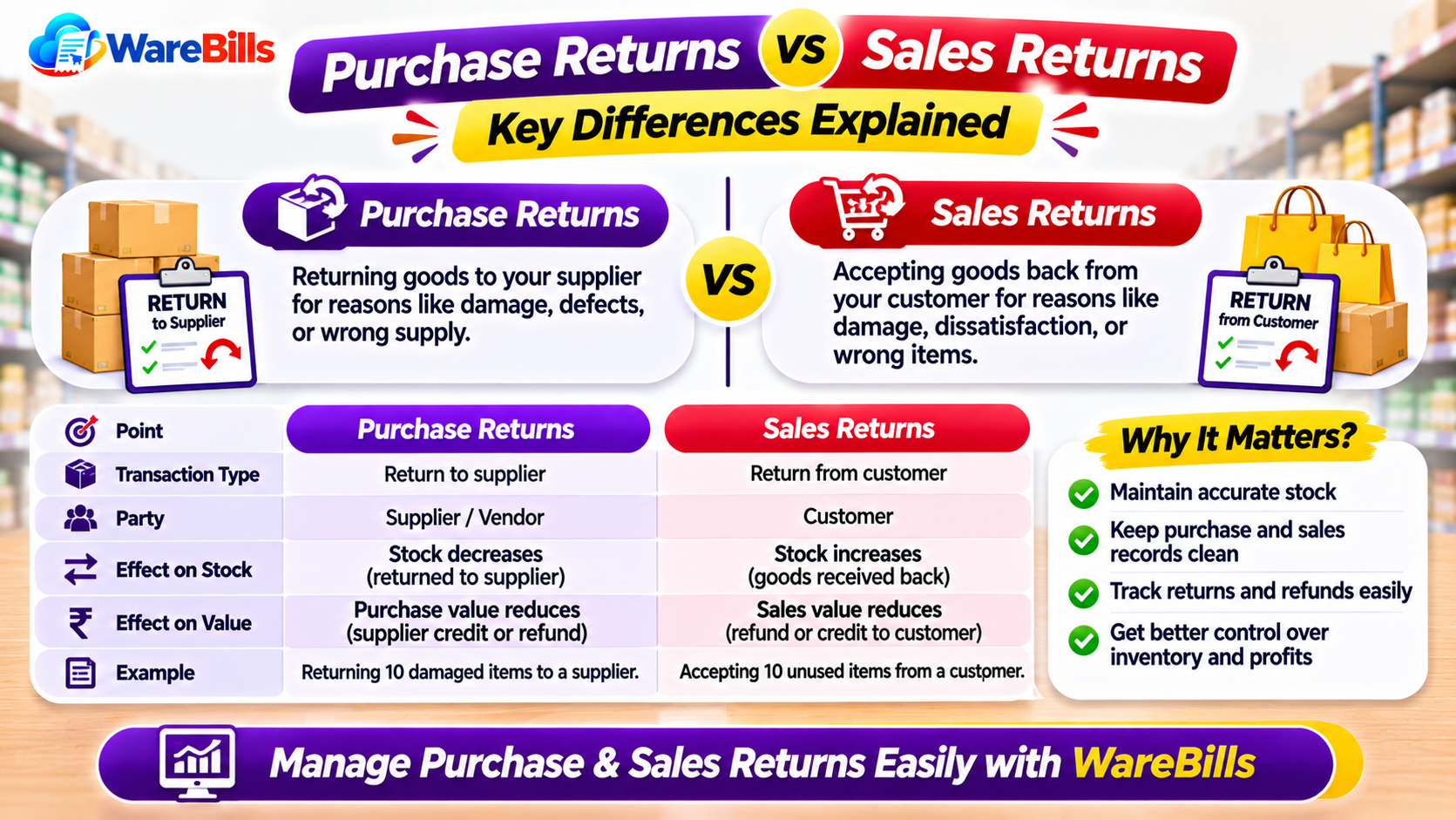
Although both transactions involve returning goods, purchase returns and sales returns have different purposes and accounting effects. Recording them incorrectly can create stock discrepancies, inaccurate sales or purchase figures, and difficulties during reconciliation.
Understanding the difference helps businesses maintain reliable inventory records and keep their billing and accounting information consistent.
1. What Is a Purchase Return?
A purchase return occurs when a business sends goods back to its supplier after purchasing them.
Common reasons include:
- Damaged or defective products.
- Incorrect products or specifications.
- Excess quantities delivered.
- Goods that do not match the purchase order.
- Other supplier-agreed return conditions.
Example:
A retailer purchases 100 units of a product from a supplier. After checking the delivery, the retailer finds that 10 units are damaged and returns them to the supplier.
The business should record the returned quantity and ensure that its inventory and purchase-related records reflect the transaction correctly.
Depending on the arrangement, the supplier may issue a credit note, provide a replacement or refund the applicable amount.
2. What Is a Sales Return?
A sales return occurs when a customer returns goods previously purchased from a business.
Common reasons include:
- Defective or damaged products.
- Incorrect items supplied.
- Products that do not meet the agreed specifications.
- Excess quantities supplied, where a return is accepted.
- Other valid reasons under the business's return policy.
Example:
A wholesaler sells 50 units to a retailer. The retailer returns five defective units, and the wholesaler accepts the return.
The wholesaler should record the returned quantity, adjust the relevant sales records and determine whether the goods can be returned to sellable stock.
The financial and tax treatment depends on the transaction and applicable rules.
3. Purchase Returns vs Sales Returns: Key Differences
The exact accounting entries depend on the accounting method, the original transaction and the business's circumstances.
4. How to Record a Purchase Return Correctly
A purchase return should be linked to the original purchase wherever practical.
Follow these steps:
Step 1: Verify the original purchase
Identify the supplier, purchase invoice, product, quantity and original purchase price.
Step 2: Inspect the goods
Confirm the quantity being returned and document the reason, such as damage, incorrect supply or excess delivery.
Step 3: Prepare the return record
Create the appropriate purchase return documentation and retain supporting details.
Step 4: Update inventory
Reduce the relevant stock quantity for the goods actually returned. If the products are damaged, keep their stock status clear until they are physically dispatched or otherwise disposed of.
Step 5: Reconcile supplier records
Check whether the supplier will issue a credit note, refund the amount or send replacement goods. Update the supplier balance according to the actual arrangement.
Step 6: Review the tax treatment
Where GST applies, handle the transaction and any related credit note or adjustment according to the applicable rules.
5. How to Record a Sales Return Correctly
A sales return should also be linked to the original sale to maintain an accurate transaction history.
Step 1: Locate the original sales invoice
Verify the customer, invoice number, product and quantity originally sold.
Step 2: Check the returned goods
Confirm that the returned products match the original sale and inspect their condition.
Step 3: Record the return
Document the returned quantity, reason, date and relevant transaction details.
Step 4: Update inventory appropriately
If the goods are returned to sellable stock, increase the available quantity accordingly. Damaged or unsellable goods should not automatically be treated as available stock.
Step 5: Adjust the customer balance
Determine whether the customer is entitled to a refund, account credit, replacement or another agreed resolution. Record the transaction consistently.
Step 6: Verify the accounting and tax treatment
Review any required credit note and related GST treatment under the applicable rules.
6. Understand the Effect on Inventory
A common mistake is to update the financial transaction without correcting the inventory records—or to update stock without recording the corresponding financial adjustment.
Consider this example:
A business has 200 units available and sells 40 units. Its stock decreases to 160 units. The customer then returns five units in acceptable, sellable condition.
The stock calculation becomes:
- Opening quantity: 200 units
- Units sold: 40
- Sellable units returned: 5
- Expected available quantity: 165 units
If the five returned units are damaged and must be quarantined, the business should distinguish physical stock from available sellable stock.
This distinction is important for accurate stock availability and future order fulfilment.
7. Common Purchase and Sales Return Mistakes
Businesses should watch out for these recurring problems:
- Recording a return without referencing the original invoice.
- Entering the wrong product or quantity.
- Updating stock twice for the same return.
- Forgetting to update inventory after an accepted return.
- Adding damaged goods to available stock.
- Failing to reconcile supplier or customer balances.
- Treating a replacement as a separate sale without documenting the original return correctly.
- Applying an incorrect tax adjustment.
- Keeping return records in a separate notebook that is not reconciled with the billing system.
A consistent return process helps prevent these errors and makes it easier to investigate discrepancies.
8. How Billing and Inventory Software Can Help
Managing returns manually becomes difficult when a business processes many purchases, sales and stock movements. Billing and inventory software may help centralise transaction records and provide a clearer view of stock changes.
When evaluating software, check whether it supports the workflows your business needs, such as:
- Recording purchase and sales returns.
- Linking returns to original invoices.
- Updating inventory quantities appropriately.
- Maintaining customer and supplier transaction records.
- Generating relevant transaction reports.
- Handling applicable tax adjustments.
Confirm the specific return and reporting features with the software provider before implementation.
Businesses can explore WareBills to assess whether its available billing and inventory features fit their purchase return, sales return and stock management workflows.
Conclusion
Purchase returns and sales returns serve different purposes, but both require accurate documentation and consistent inventory and financial updates.
By linking returns to their original transactions, checking product conditions, updating stock correctly and reconciling customer or supplier records, businesses can reduce errors and maintain better control over their operations.
A clearly defined return process, supported by suitable billing and inventory software, helps businesses manage returned goods more efficiently.